Key Takeaways
- Installed is not running. A new PHP package does nothing until the web server or the PHP-FPM workers restart.
- Check the PHP that serves traffic. The command-line version, the web server version, and a copy bundled inside an application can all differ.
- Version numbers can mislead. Linux vendors often backport fixes without changing the number, so read the package changelog for both CVE numbers.
- Attack attempts are reported. Several security firms have seen them. watchTowr had seen no successful exploitation at its last report.
- Patching does not undo a visit. Look for PHP workers starting shells, and rotate secrets if you find signs of entry.
Somewhere in your team, a ticket now says “PHP patched.” Someone ran the update, saw no errors, and closed it. Do not accept that at face value yet.
PHP2Shell is the name for two critical PHP flaws, CVE-2026-109618 and CVE-2026-109619. PHP released fixes on 21 October, and security firms have since reported attack attempts against unpatched servers. When a flaw lets a stranger run code, a patch that is installed but not running leaves you as exposed as before.
Our first post covered what is confirmed and what to patch. This one is about PHP2Shell patch verification. It covers how to prove each server is fixed, what the partial settings can and cannot do, and how to check whether anything got in earlier. We build and support Drupal and other PHP sites, so we are a vendor with a stake here. PHP’s own advisory outranks anything written below.
Where Patches Quietly Fail
Patches fail in a small number of boring ways, and almost none of them show an error. If you have not built your inventory yet, start with our first PHP2Shell post, then use Table 1 to test each entry on it.
|
Setup
|
Common miss |
How to confirm
|
| Single server on OS packages |
Package updated, but workers still run the old binary |
Compare the worker start time with the update time |
| Apache with mod_php |
Apache not fully restarted, so the old PHP stays loaded |
Restart Apache, then check the process start time |
| PHP-FPM behind a web server |
One PHP version updated while another still serves a site |
List every installed version and every running master process |
| Containers |
Image rebuilt, but old containers still run, or the base image is pinned |
Check the image digest of the running container, not the tag in the repo |
| Bundled PHP in a stack or product |
The copy sits outside the package manager |
Find the binary the application launches and read its version |
| Managed or shared hosting |
Provider says “patched” with no version or date |
Ask for the version, patch date, and restart time in writing |
Two rows deserve extra care. PHP reports mod_php as the highest-risk setup, because an attack can land before any application code runs. Distribution packages are the other trap. A package that still looks old may be fixed, and one that looks new may not be.
Read the changelog for both CVE numbers, or your vendor’s security tracker. Patch status differs by distribution and changes within hours, so trust the tracker over any blog post, ours included.
A Routine Anyone on the Team Can Run
Run this on every internet-facing PHP system first. Keep it plain enough that a second person can repeat it.
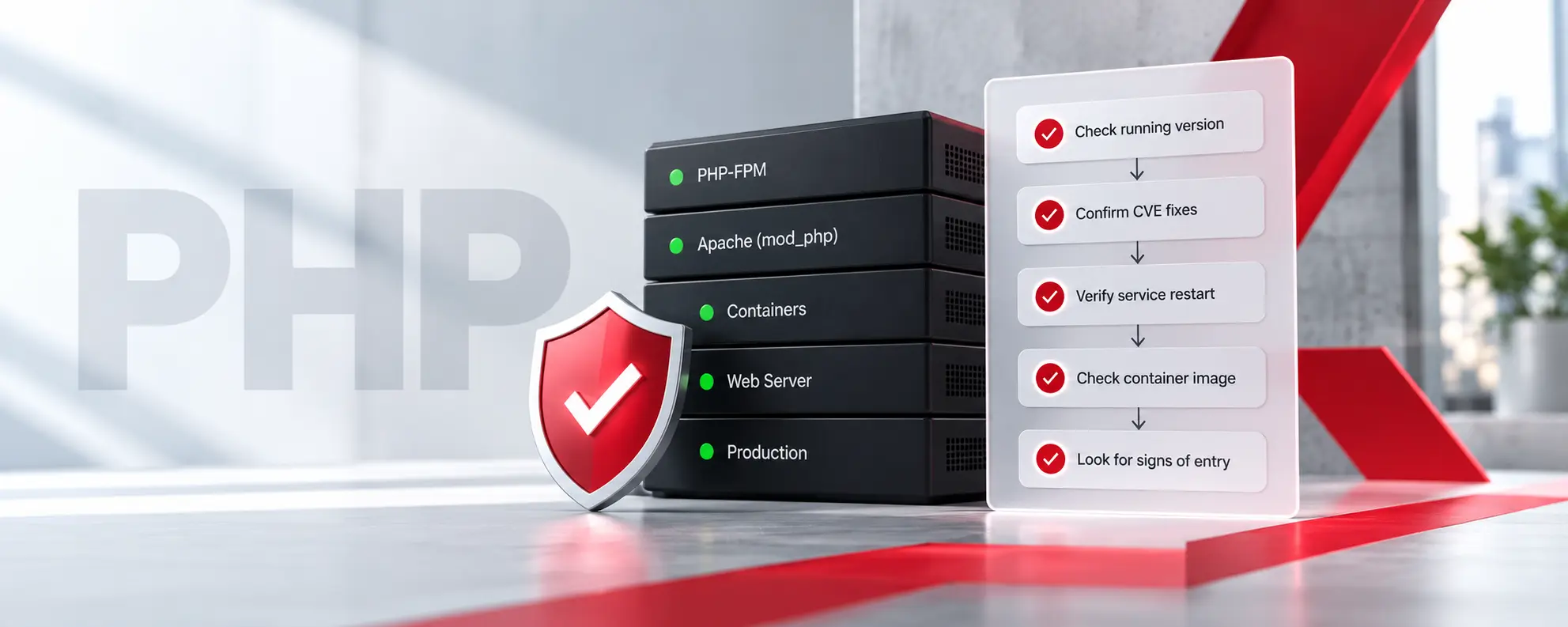
- List what is actually running: Find the processes that serve web requests: PHP-FPM masters, Apache workers with mod_php, php-cgi, FrankenPHP, or LiteSpeed. Do not start from the list of installed packages.
- Read the version from the serving binary: Ask the binary that handles traffic, not the first PHP on the command line. A response header may show the version, but many sites hide it, so treat it as a hint.
- Match it to a fix: The fixed releases are 8.5.12, 8.4.27, 8.3.36, and 8.2.35. On a distribution, match the package changelog to the two CVE numbers instead.
- Check the worker start time: If the processes started before the update, restart the service and check again.
- Check containers by digest: Confirm the running container uses the rebuilt image and not a tag that merely looks right.
- Write down the evidence: Record the host, version, package source, restart time, and who checked. Auditors, insurers, and your own team will ask for it later.
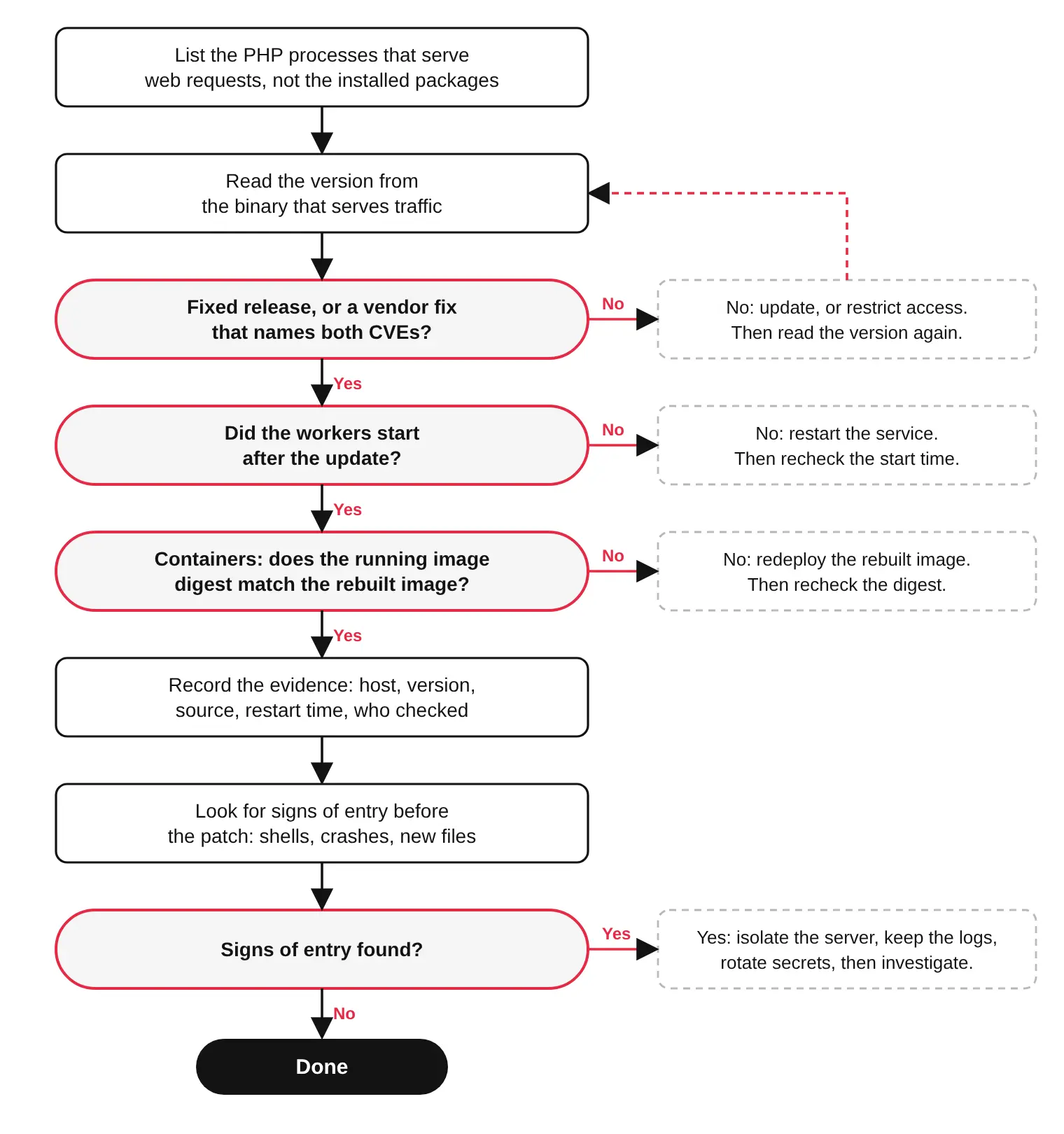
If this feels like a lot for one flaw, it is the same routine a good maintenance plan runs every month.
What the Partial Settings Do and Do Not Do
PHP’s security advisory lists settings that reduce exposure on servers you cannot patch yet. They include tight request body limits, a memory limit that applications cannot override, and turning off session upload progress. PHP also names a container memory limit as the safer way to cap memory.
Two details trip people up. The session setting must go into server-level configuration, such as php.ini or the PHP-FPM pool, followed by a worker restart. Setting it from application code or a per-directory .user.ini file does not apply it.
The larger point is PHP’s own. These steps “do not make an installation safe,” and updating is the only safe choice. Treat them as a few hours of cover, and take the exact values from the advisory and not from us.
Were You Hit Before You Patched?
Patching closes the door. It does not tell you who walked through first. watchTowr, Cloudflare, and Patchstack all reported attack attempts on 21 October, and one firm reported attacks at scale before the fixes shipped. Patchstack described mostly probing so far. Still, your exposure began before your patch did.
Look for these signs, strongest first:
- PHP workers starting other programs. Huntress’s guidance points to php-fpm, php-cgi, httpd, or apache2 launching shells, interpreters, or download tools. A web server should rarely do that.
- Unexplained crashes. Workers that die or restart without a deploy, and bursts of HTTP 500 responses.
- Odd uploads in the logs. Malformed or unusual multipart requests, especially to pages that never accept uploads.
- New things in the web root. Unknown PHP files, new scheduled jobs, and new accounts.
If you find any of them, isolate the server. Keep the logs and a configuration snapshot before you change anything. Reporting says the flaws can expose process memory, which may hold credentials and API keys. If the signs point to a successful hit, rotate every secret the PHP process could read.
Be careful with “proof of concept” repositories while you investigate. Some of them carry malware.
Older Versions Make Proof Harder
PHP 8.1 and older get no official update. The project published minimal source backports for 7.4, 8.0, and 8.1, and some distributions backport fixes into their own packages. Ask your vendor for the package that names both CVEs. If there is none, restrict access and plan the upgrade.
PHP 8.2 reaches end of life on 31 December 2026. A site on 8.2 that is patched today still needs an upgrade plan for the new year.
Conclusion: What Done Looks Like
Done is not a closed ticket. Done is a list. For each internet-facing system, it names the PHP that serves traffic and shows a fixed release or a vendor fix for both CVEs. It records a restart after the update. It also shows that someone looked for signs of entry from before the patch.
Until a system reaches that state, treat it as unpatched. That sounds strict. It is also the only version of done that survives an audit or an incident review.
Show us your patch evidence. Send us the list you have, even if it is half empty: hosts, PHP versions, and who patched what. We will tell you which entries we would not yet trust and what to check next. Talk to Our Team →
Frequently Asked Questions
How do I check if my server is patched for PHP2Shell?
Find the PHP that serves your web requests and read its version. Compare it with the fixed releases 8.5.12, 8.4.27, 8.3.36, and 8.2.35, or with your vendor’s fix for CVE-2026-109618 and CVE-2026-109619. Then confirm the PHP workers restarted after the update.
Do I have to restart PHP after updating?
Yes. Installing a new package does not change processes that are already running. Restart PHP-FPM, Apache, or whichever service runs PHP so the patched binary loads. For containers, rebuild the image and redeploy it.
My Ubuntu or Debian server still shows an older PHP version. Is it unpatched?
Not necessarily. Linux vendors often backport a fix without changing the version number. Check the package changelog for the two CVE numbers, or your vendor’s security tracker, because patch status differs by distribution and changes quickly.
How do I know if my site was compromised before I patched?
Look for PHP worker processes starting shells or download tools, unexplained worker crashes, bursts of HTTP 500 errors, new files in the web root, new scheduled jobs, and new accounts. Preserve your logs and a configuration snapshot before you change anything.
My host says everything is patched. What should I ask for?
Ask for the PHP version that serves your site, the date of the patch, and the time the services restarted. Also ask whether the fix is an official PHP release or a vendor backport. A confident reply without those details is not proof.