Key Takeaways
If your website, store, or app runs on PHP, this week’s security update belongs on today’s task list, not next sprint’s.
PHP’s maintainers have scheduled security releases for 19 November. They cover all supported versions, and the most serious issue is rated critical. The update arrives weeks after an October emergency fix for two critical flaws that attackers have already tried to exploit. If you have not applied that earlier fix, it is your first job.
You are reading this guide because it’s a today’s read and it explains what was fixed last time, who is exposed, and what to do in the next hour, the next week, and the next month. It is a PHP security update you can act on right away.
The story has four dates worth knowing:
As The Hacker News reported, the maintainers say the new releases address flaws affecting all supported PHP versions. They rate the highest severity as critical, but say the critical issues need a non-default or uncommon setup. No further details were disclosed.
One note on timing. This article was written before the release window opened, so it does not list the new version numbers. Check the PHP site for the exact numbers once the releases are out.
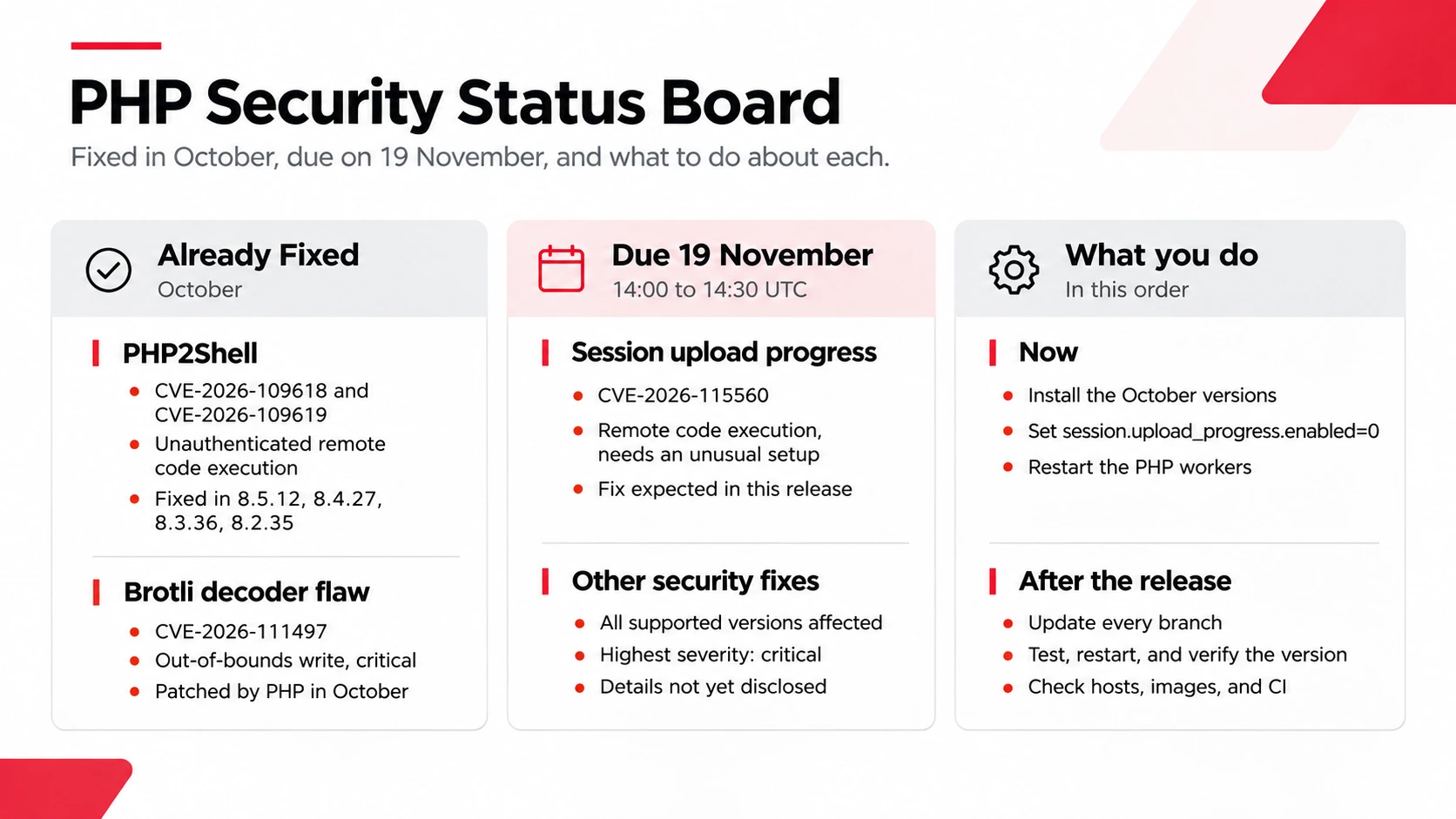
Tracked as CVE-2026-109618 and CVE-2026-109619, these flaws let an attacker with no account run code on a server by sending crafted web requests. Both are rated critical. The fix is PHP 8.5.12, 8.4.27, 8.3.36, or 8.2.35, or anything newer on the same branch.
The attackers moved fast. Amazon’s honeypots logged an exploit attempt on 17 October, four days before disclosure, and Cloudflare reported attempts climbing into the millions within days.
Confirmed compromises have been limited so far, mostly against management interfaces and security gateways, and Hunt.io found 616 PHP2Shell-related files across several hosts by 30 October.
One researcher quoted by The Register said some public proofs of concept work against default mod_php setups but not PHP-FPM.
Do not lean on that detail. Attackers target whatever is reachable and unpatched.
This remote code execution flaw only works when three things are true at once:
PHP calls this setup unlikely in practice, and an application that never changes the handler while running is not exposed through this path.
PHP says the fix will arrive in a regular release, and the 19 November (Today) one is expected to include it, though that is not confirmed.
Until then, the stopgap is session.upload_progress.enabled=0, followed by a restart of your PHP workers so the change takes effect.
This is a critical out-of-bounds write in the Brotli decoder library, which could lead to arbitrary code execution. In simple words, it is a memory error that an attacker could use to run their own code. PHP patched it in October. The reports I read describe attacks against the two PHP2Shell flaws, and none reported for the session flaw.
PHP supports several branches at once. Based on the October releases, those are 8.2, 8.3, 8.4, and 8.5, with the older two in security-only support. Anything older, including PHP 7 and 8.1, no longer receives fixes. The supported versions page lists the current dates.
Packaged PHP deserves one extra note. A Linux distribution or hosting provider may backport a fix without changing the visible version number, so the provider’s own security notice matters as much as the number you see.
Now, before the 19 November release
After the release
This week
Turning off session upload progress is an interim setting, not a fix. PHP gave it as the stopgap for the session flaw, and the October advisory also named it as a mitigation for CVE-2026-109619. It does not replace the October update. If a patch really has to wait, reduce your exposure in the meantime:
These steps buy a little time. They are not a plan.
Most site owners do not control PHP directly. Their host does. Ask your host three things: which PHP version is my site on, when will it be on the fixed version, and will you tell me when it is done?
On your own servers, test your CMS core, themes, and modules on the new point release in staging before you switch. If you are on PHP 8.1 or older, the jump to a supported branch needs more testing, and it is often the moment to ask whether the site itself is due for work. The signs, costs, and options for modernizing a legacy system are worth a read before you decide how big that step should be, and platform modernization covers the larger moves.
You may need a short update for people who do not read security advisories. Keep it to four lines:
The best response to the next PHP advisory is one nobody notices. These habits get you there:
If every update feels like a project, the real issue is usually technical debt slowing your release cycle, and no single patch will fix that.
Order matters in this PHP security update. Install the October versions, turn off session upload progress until the next release, update every branch when the 19 November (Today)versions land, and then use the experience to fix how you patch. The flaws will fade from the news, but the habit stays useful.
Not sure which of your PHP applications are exposed, or where to begin? Book a Discovery Call, bring your list of sites and servers, and we will help you work out what comes first.
Act now and protect your websites before a minor issue turns into a major problem.
Is the 19 November PHP update critical?
PHP’s maintainers say the highest severity is critical, but that critical issues need a non-default or uncommon setup. Treat it as urgent for internet-facing systems, and schedule it promptly for internal ones.
I already installed the October update. Am I done?
That update fixed the PHP2Shell flaws. The session upload issue, CVE-2026-115560, was handled with a setting until the next regular release, and the 19 November release is expected to include its fix. Update again, and keep session upload progress off until you have.
Does turning off session upload progress fully protect me?
No. It is an interim setting that PHP gave as a stopgap. It does not replace the October update that fixes PHP2Shell, or the 19 November release.
Which PHP version should I run?
A supported branch on its newest point release. Prefer the newest branch your application supports, because older branches receive only security fixes and then stop.
Will updating break my site?
Point releases within a branch rarely do, but test in staging first. Check that your CMS, themes, and modules support the version, then roll out to public-facing systems first.
What if I still run PHP 7 or PHP 8.1?
Those versions no longer receive fixes, so these patches will not reach them. Plan a move to a supported branch, and treat it as urgent if the system faces the internet.

 Patch Management, Website Security
Key Takeaways Seven of the 18 fixes are rated Critical at 9.2. Four are rated High and six Moderate, and the last is a library upgrade with no advisory of its own. PHP says the critical ones need a non-default configuration or an uncommon setup. Each critical flaw has its own set of conditions. Persistent […]
 AI & Enterprise Strategy, Digital Marketing
Key Takeaways AI-enabled is a label, not a standard. Judge an agency on its real workflow, not on the words in its pitch. A good AI-enabled agency gives the volume work to AI and the judgment to people. Scanning, drafting, testing and reporting are automated. Strategy, brand and approvals are not. Human oversight is the […]
 AI & Enterprise Strategy, Healthcare Technology
Key Takeaways Start with administrative work, not diagnosis. Patient access, intake, and prior authorization support have high volume and clear rules, and they do not need clinical judgment. The model is the easy part. Identity, data paths, and sign-off decide whether an agent gets through a security review. HIPAA compliant AI agents need a BAA […]