Digital Transformation Checklist: 25 Things to Review Before You Begin

Hem Kant
·
04 Nov, 2026
A digital transformation checklist is a list of questions you answer before you spend money on new technology. Its job is not to tell you what to buy. Its job is to show you whether your organization is ready to buy anything at all.
Projects that stall usually stall for reasons that were visible before the build began. Nobody agreed on the outcome. Nobody counted the systems already running. Nobody asked who would keep the new thing alive. Each gap is cheap to close in planning and expensive to close in delivery. Use the list before a first transformation, before a replatforming, or to restart a project that has lost momentum.
Below are 25 checks in five groups. Four follow the stages of our Digital Progression Framework: stabilize, connect, operate, and orchestrate. One comes first, because purpose and ownership come before any of them.
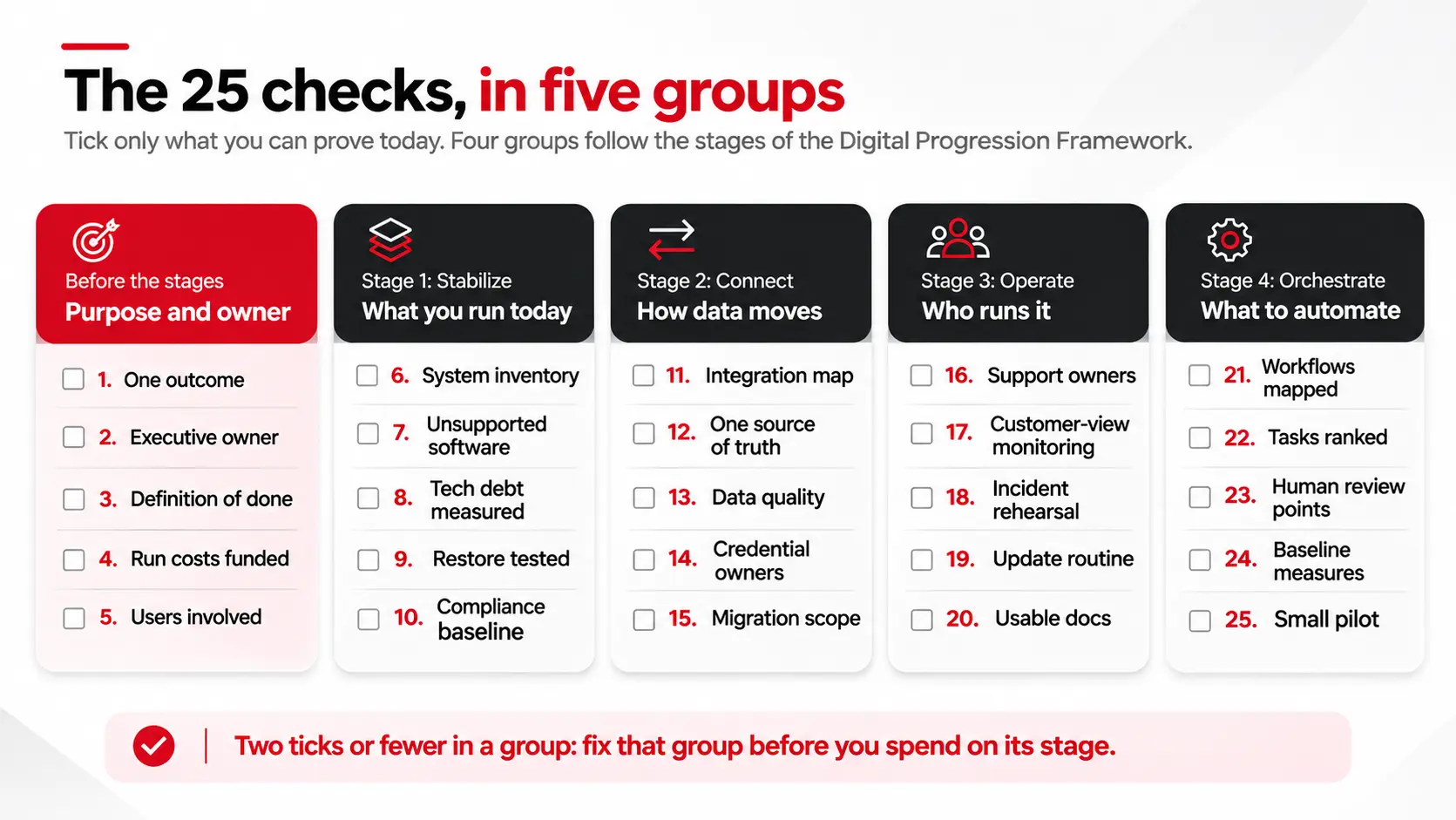
A tick needs evidence. Something you can open, name, or show counts: a document, a person, or a result. A good intention does not. If someone says “we mostly have that”, leave the box empty and write down what is missing. Those notes become your planning backlog.
Technology choices come later. These five checks decide whether the project has a reason to exist and someone to answer for it. We have covered why every failed tech project has the same root cause explains why this group comes first.
This is the Stabilize stage. You cannot transform what you cannot list. Our step-by-step guide to legacy system modernization covers this work in depth.
This is the Connect stage. Transformations touch the places where systems hand data to each other, and that is where surprises hide.
This is the Operate stage, and the one projects skip. A transformation that nobody supports becomes next year’s legacy system.
This is the Orchestrate stage. Automation multiplies whatever it is given, including a bad process, so map the work first.
Count your ticks. It is a judgment aid, not an industry benchmark.
| Ticks (0f 25) | What it suggests | Next step |
| 21 to 25 | Ready to plan | Write the roadmap and choose a pilot |
| 13 to 20 | Ready, with gaps | Spend the first month of planning closing them |
| 0 to 12 | Not yet | Pause the build budget and fix the basics |
Then apply the group rule. A group with two ticks or fewer is a blocker even when the total looks healthy. A strong score on automation does not rescue a weak score on support, because automation without an owner breaks quietly.
Score it as a team. Ask three people to tick independently, then compare. Where they disagree, nobody has the evidence yet, and that is the first thing to find out.
Write the date and the score at the top of the page, and file it. Next quarter, compare. A rising score tells you more than any single number does.
The list is simple, which makes it easy to use badly. Watch for three habits:
None of these is a technology problem. Each is a habit, so the fix costs attention, not budget.
A checklist does not make decisions. It makes gaps visible while closing them is still cheap. The most useful result is not a perfect score. It is a team that agrees on which boxes are empty.
If you would like a second opinion on your score, Book a Discovery Call, bring your ticked list, and we will tell you which two gaps to close first.
What is a digital transformation checklist?
It is a list of questions you answer before you invest in new technology. It shows whether your goals, systems, data, support, and processes are ready, so the gaps are fixed in planning instead of during delivery.
Who should fill in the checklist?
Do it as a team. Include the executive owner, someone from IT or engineering, an operations lead, and a person who uses the systems daily. Have each person tick independently, then compare. The disagreements are the most useful result.
Do we need to tick all 25 boxes before we start?
No. Use the group rule instead. If any group has two ticks or fewer, fix it before you spend on the stage it covers. A group with three or four ticks can be finished alongside early planning.
How long does the first pass take?
A first pass takes one working session with the right people in the room. Gathering evidence for the unticked boxes takes longer, and that work is the real value of the exercise.
How is a checklist different from an audit?
A checklist is a self-check that your team runs in one session. An audit is an outside review that gathers evidence and tests each claim. Many teams start with the checklist, then ask for an audit where the empty boxes cluster.
How often should we revisit the checklist?
Every quarter, and before any large spending decision. Systems, owners, and vendors change, so a box that was ticked last year may not be true today.

 Digital Transformation
A purchase request lands in a manager’s inbox on Monday. She is traveling, so it sits. On Wednesday it gets buried under forty newer emails. By Friday, the person who asked is not sure whose turn it is, so finance steps in and sends a reminder. The request was approved the following Monday, six days […]
 Digital Transformation, Platform Strategy
Picture the same Tuesday morning, a few months from now. Someone closes a deal in the CRM. The billing record updates itself in the background. Nobody opens a second tab. Nobody retypes a single detail. That is not a fantasy. It is what actually happens once this problem gets fixed, and it is a smaller […]
 Digital Transformation
A system does not become a problem simply because it is old. Some platforms run reliably for a decade or more. Others become difficult to change after only a few years. The difference is not the date the system was built. It is what the system now costs your business to maintain, change, secure, and […]