How To Use FSM Transition States In PHP Applications
Sunil
·
17 Sep, 2025
Have you ever felt as though your app is caught in a never-ending cycle, and you’re unsure of what to do next? That’s where the concept of transition states comes in. It helps your app smoothly move from one stage to the next, making sure everything keeps running without any breakage or glitches. Whether you’re managing complex workflows or tracking user progress, transition states make sure your app knows exactly what to do based on what’s happened before.
In this blog, we’ll dive into how to implement this powerful technique in PHP using a state table. It’s like giving your app a roadmap, ensuring it always knows the right turn to take. Ready to guide your app through its next adventure? Let’s get started!
A Finite State Machine (FSM) is a computation model that is applied to the design of state-separate systems. Specifies States: Various points in the process (e.g., “Start,” “Processing,” “Completed”).
The transition from one state to another and is usually triggered by some conditions or events (e.g., “Success”, “Failure”).
An FSM is beneficial in workflows where the system behaves differently depending on what state it is in, and it helps in tracing processes and which kind of action should be taken next.
In PHP, FSM transition states are helpful in managing asynchronous operations, retries, and task failures in a structured manner. Consider an application that needs to handle tasks like copying files to a remote server. The copying process may not finish instantly, so the system needs to wait and periodically check the progress.
FSMs provide a clear structure to your application by organizing tasks and their transitions.
FSMs can automatically retry tasks if they fail or move to a failure state after multiple attempts.
FSMs work well with asynchronous operations, such as waiting for a file copy to finish or waiting for an external API to respond.
You can track each task’s state and know exactly where it is in the process.
For example, you have to copy a massive dataset from one server to another asynchronously. This needs to be done in several steps, and at any step, you’ll likely want to check its progress or decide to retry or fail the task. And here come FSMs.
To better understand FSMs in PHP, let’s break it down with an example. In the state machine, you will define the states, transitions, and actions.
State Table Example
Here’s an example state table for a file-copying operation:
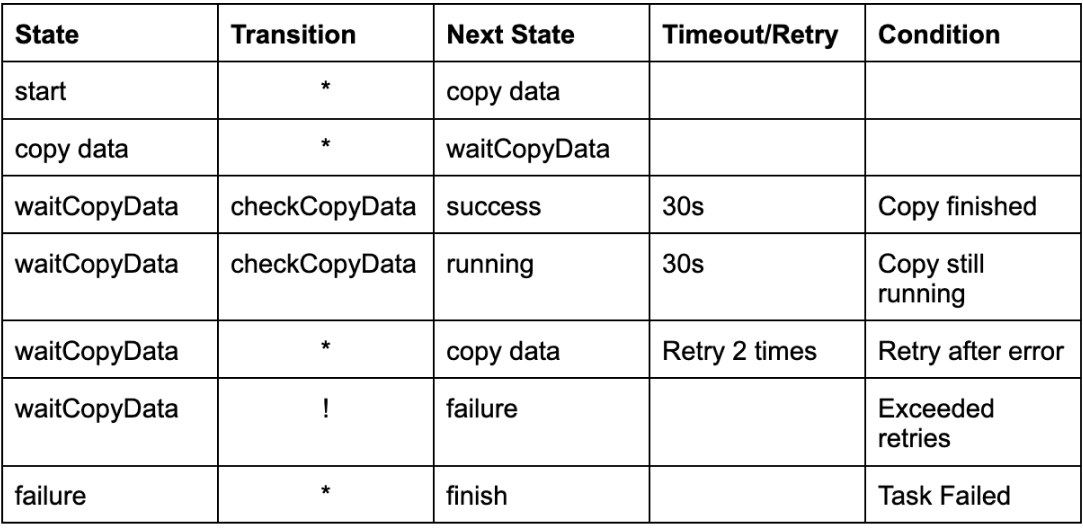
Start State: Initializes the process and sets up necessary variables.
Copy Data State: Begins the file copy process asynchronously.
Wait for Copy Data: Checks the status of the file copy. It has transitions based on the result of the copy operation.
Failure State: Handles errors and finalizes the operation if all retries fail.
Finish State: Completes the process, indicating success or failure
The state transitions depend on the outcome of the task. For example, if the file copy is still running, the system waits and retries. If it succeeds, it moves to the finish state. This ensures the system can handle errors, retries, and asynchronous tasks in a manageable way.
Let’s dive into the PHP code that implements FSM for our example of copying data.
Let’s dive into the PHP code that implements FSM for our example of copying data.
?php

class FSM {

private $state;

private $context;

private $retryCount = 0;

private $maxRetries = 2; // Maximum number of retries

private $stateTable = [];
public function __construct() {
$this->state = 'start'; // Initial state
$this->context = [];
// Define the state table with states and transitions
$this->stateTable = [
'start' => [
'*' => 'copyData' // From 'start', transition to 'copyData'
],
'copyData' => [
'*' => 'waitCopyData' // From 'copyData', transition to 'waitCopyData'
],
'waitCopyData' => [
'checkCopyData' => [
'success' => 'finish', // On success, transition to 'finish'
'running' => 'waitCopyData', // If still running, wait 30 seconds
'*' => 'copyData', // Retry if error (up to 2 times)
'!' => 'failure' // If failed after retries, go to failure
]
],
'failure' => [
'*' => 'finish' // End the process on failure
]
];
}public function run() {
while ($this->state !== 'finish') {
echo "Current state: $this->staten";// Get the possible transitions for the current state
$transitions = $this->stateTable[$this->state];// Perform the transition based on the condition
if (isset($transitions['checkCopyData'])) {
$status = $this->checkCopyData(); // Get the current status (success, running, or failure)
echo "Copy data status: $statusn";$nextState = $transitions['checkCopyData'][$status] ?? $transitions['checkCopyData']['*'];
if ($status === 'running') {
echo "Waiting for 30 seconds...n";
sleep(30); // Wait 30 seconds before checking again
} elseif ($status === 'failure' && $this->retryCount < $this->maxRetries) {
$this->retryCount++;
$nextState = 'copyData'; // Retry the operation
echo "Retrying... Attempt $this->retryCountn";
sleep(30);
}
} else {
// Transition based on simple conditions (* is wildcard)
$nextState = $transitions['*'];
}// Move to the next state
$this->state = $nextState;
}echo "Process completed.n";
}private function checkCopyData() {
// Simulate checking the status of the copy process
if ($this->retryCount < $this->maxRetries) {
return 'running'; // Simulate still running
}
return 'failure'; // Simulate failure after max retries
}
}
// Initialize and run the FSM
$fsm = new FSM();
$fsm->run();
?>
The output of the provided PHP code will simulate the execution of the Finite State Machine (FSM) through its states and transitions. Here’s a step-by-step breakdown of what will happen when you run the code:
Output : Current state: start
Output : Current state: copyData
Output
Current state: waitCopyData

Copy data status: running

Waiting for 30 seconds...
Output
Current state: waitCopyData

Copy data status: running

Waiting for 30 seconds...
Output
Current state: waitCopyData

Copy data status: failure

Retrying... Attempt 2

Waiting for 30 seconds...
Output: Current state: failure
Output : Process completed.
Combining all the steps above, the full output when you run the code will look like this
Current state: start

Current state: copyData

Current state: waitCopyData

Copy data status: running

Waiting for 30 seconds...

Current state: waitCopyData

Copy data status: running

Waiting for 30 seconds...

Current state: waitCopyData

Copy data status: failure

Retrying... Attempt 2

Waiting for 30 seconds...

Current state: failure

Process completed.
Let’s understand the code in more detail.
In the constructor (__construct), we initialize the starting state (start) and define the state transitions in the stateTable.
The run() method is the core logic. It loops through the states and transitions until it reaches the finish state.
For each state, we check the available transitions. If a transition involves checking the status of a task (e.g., checkCopyData), the method checkCopyData() is called to simulate checking the process status.
If the task is still running, we wait for 30 seconds before checking again. If the task fails, the system will retry up to 2 times before transitioning to the failure state.
Finite State Machines (FSMs) offer a structured way to handle complicated workflows and asynchronous tasks in PHP applications, ensuring reliability and scalability. At LN Webworks, we support advanced techniques like FSMs to build seamless, error-resistant applications.
Contact us today to discover how we can take your project to the next level.Our expert team is here to help you optimise your processes and deliver efficient, innovative solutions.

 Other, SaaS Development
SaaS CRMs win on speed. Custom wins on fit and ownership. This isn’t a pitch for either one. Every early-stage SaaS company hits this decision within the first year, usually right after the founder realizes a spreadsheet isn’t a CRM. The default answer is almost always a SaaS CRM: HubSpot, Salesforce, Zoho, sign up in […]
 Other
Other
Most “audits” and “assessments” promise clarity but deliver a sales deck with language that lacks clarity. You book the call expecting evidence about your specific platform, and what shows up is a generic pitch for whichever package is easiest for the firm to sell. That’s the actual reason process transparency matters here, not because a […]
 Other
Other
In late June and early July, videos started circulating on Instagram of people walking up to moving e-rickshaws, tapping a phone, and watching the vehicle lose power mid-ride. It spread as a prank trend before anyone fully understood the mechanism. Drivers in Patna (India) reported it first, assuming mechanical failure, until investigators traced it to […]