Failed PCI Scan on a Drupal Site: What to Fix First
LN Webworks
·
04 Nov, 2026
A failed PCI scan report on Drupal site is a list of symptoms. It is not a project plan. Forty lines of findings on a Drupal site usually trace back to four or five causes. The order you fix them in decides whether you pass this quarter or next.
We have covered how to sort a failed report into four buckets and fix them in order. A disclosure first: ServerScan, a PCI scanning service, names LN Webworks as its remediation partner, and we also built its Drupal site. So we have an interest in this topic. The sorting method works with any scanner and any team working toward Drupal PCI compliance.
External scans run at least every 90 days, and a single finding scored 4.0 or higher on the CVSS scale (0 to 10) fails the entire report.. That includes medium severity findings, which surprises many teams. The scanner sees your site from outside, so it reads version strings, TLS settings, headers, and open ports.
That outside view is why one cause creates many lines. An old Drupal version can appear as several findings, one for each known vulnerability in that release. A weak TLS setting can appear once per port. Fix the cause and a dozen lines disappear together.
Scope is a third trap. The scan covers every public address in your scope. A forgotten staging site or an old marketing subdomain running an old Drupal can fail the report while the main store is clean. List every address before the scan, and retire the ones nobody uses.
Read the report once, then tag every finding with the kind of work that clears it.
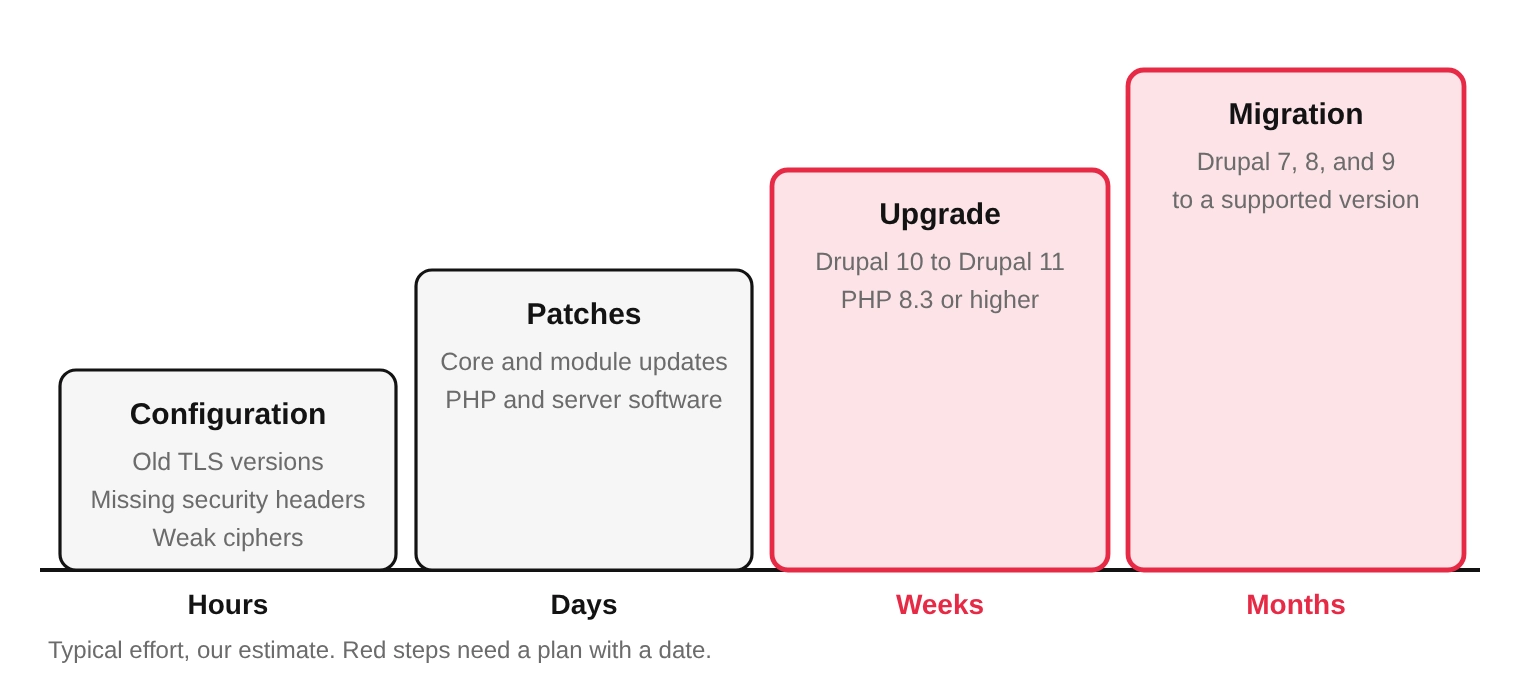
This is the fastest win. TLS 1.0 and 1.1 are flagged under PCI DSS 4.0.1 even on servers where card data does not flow. Missing security headers, such as HSTS, and weak ciphers also land here. All of it is fixed in the web server, load balancer, or CDN, and none of it needs a Drupal release. Do this first, because it removes noise from the report.
On a Drupal site, set the headers at the web server or CDN, not in a module. The server covers every response, including files and error pages, and a module covers only pages that Drupal itself renders.
Next come Drupal core, contributed modules, PHP, and server software that are behind on security releases. These take days because each update needs testing on a staging copy. Teams that patch monthly rarely see this bucket grow.Our Drupal support and maintenance work covers Drupal security updates after launch, which keeps this bucket small.
This bucket holds sites that are on a supported Drupal line but running out of road. It is the one that will grow in December, when Drupal 10 reaches end of life, and the next section explains why.
A Drupal 10 to 11 upgrade takes weeks, because custom code and modules need to be checked first The Upgrade Status module lists incompatible code, so run it before you plan. Ask your host early for PHP 8.3 and a supported database, because those requests often wait in a queue.
Sites on Drupal 7, 8, or 9 are already unsupported and cannot be patched into compliance. They need a Drupal migration, and that is a project with a date, a budget, and an owner Everything in the other three buckets still helps, because it keeps the report clean while the migration runs. Paid extended support can patch known Drupal 7 issues during the move. Ask your scanning vendor how it will treat a patched site that still reports an old version before you rely on it.
Not sure which bucket your findings fall into? Send the report to our Drupal development team and we will sort it
| Version | Support Status | Move to Make |
| Drupal 7 | Ended January 2025 | Migrate. Use extended support only as a bridge |
| Drupal 8 and 9 | Already unsupported | Migrate to Drupal 11 |
| Drupal 10.5 and earlier | Security support ended in June 2026 or before | Update to 10.6, then upgrade to 11 |
| Drupal 10.6 | Security fixes end the week of 7 December 2026 | Upgrade to 11 now |
| Drupal 11 | Supported. Needs PHP 8.3 or higher, and MySQL 8.0 or MariaDB 10.6 | Keep it patched |
Drupal 10 reaches end of life on 9 December 2026, which is about six weeks away. After that date the core security team stops issuing advisories and patches for it. A site that passes today can pick up a new finding the quarter after, simply because its software is no longer maintained. A site must be on Drupal 10.3 or later before Drupal 11 will install, so check that first.
Some findings are wrong. A managed host may backport a security fix without changing the version number, and the scanner reads the number and reports the old flaw. In that case you send evidence to your scanning vendor, and the report is updated if the evidence holds. If it does not, you must fix the issue before a passing report can be issued.
Keep disputes for true false positives. A dispute that fails costs days in a quarter that has few to spare. When you are unsure, tag the finding as real and fix it.
Plan the fixes as one release. Make the configuration and patch changes on staging, test the checkout and any payment pages, then ship together and rescan. Your scan after remediation must produce a passing report within the same quarter, and a scan is also required after a significant network change. One planned release means one rescan instead of three.
If the deadline is close, start early. A migration or upgrade cannot be squeezed into the last week of a quarter, but the configuration and patch buckets often can. Clear those first, then show your acquirer or assessor the plan and date for the rest.
Keep the evidence as you go: the failed report, the change tickets, the deployment dates, and the passing report. An assessor will ask for the trail, and a dated record turns a stressful call into a short one.
Once the report is sorted, write a short status note for whoever asks about compliance. It needs three lines:
That note shows control. A promise to fix everything soon does not, and an assessor can tell the difference.
Send us the failed report. Download the latest report from your scan portal and send it to us. We will sort every finding into the four buckets and quote the work. Book a Discovery Call →
How often do I need a PCI scan?
An external vulnerability scan from an approved scanning vendor is required at least once every 90 days, and again after any significant network change. This is requirement 11.3.2 of PCI DSS.
What score fails a PCI scan?
Any finding scored 4.0 or higher on the CVSS scale fails the whole report, including medium severity findings. One finding can repeat across many lines in the report, so the count looks worse than the number of causes.
Will a Drupal 7 site fail a PCI scan?
Expect findings. Drupal 7 reached end of life in January 2025, so new core and module vulnerabilities go unfixed. Paid extended support from third parties can bridge the gap, but it is not a replacement for moving to a supported version
When does Drupal 10 stop being supported?
On 9 December 2026. Only Drupal 10.6 still receives security fixes, and that support ends the week of 7 December. Sites on 10.5 lost security support in June 2026.
Can I dispute a finding on my scan report?
Yes. You send evidence to your scanning vendor, which updates the report if the evidence holds. If the evidence is not enough, you must fix the issue before a passing report can be issued.
Do I need to rescan after fixing the findings?
Yes. Your scan after remediation must produce a passing report within the same quarter. Ask your provider whether rescans are included, and fix everything in one release so that you need only one.
How long does it take to fix a failed PCI scan on Drupal?
Configuration fixes take hours, patches take days, upgrades take weeks, and a migration takes months. Fix them in that order and rescan once.
Does a failed scan mean my site was hacked?
No. The scan reads your site from outside and flags versions, settings, and open ports. A failed report means findings need fixing, not that a breach occurred

 SaaS Development
Key Takeaways Order matters more than speed. SaaS products are usually delayed by rework, not by slow typing. Three phases of five steps: decide, build, and launch. Each phase ends with a gate, a plain statement you can check before moving on. Four foundations are costly to retrofit: tenancy, access control, billing, and measurement. Launch […]
 Legacy Modernization
Key Takeaways Both paths fail, in different ways. Modernizing fails by never finishing. Rebuilding fails by losing rules nobody wrote down. A rebuild needs two keys: at least one real reason to rebuild, and all three conditions that make it safe. Old code holds knowledge. Years of fixes live in it, and a rebuild discards […]
 Digital Transformation
Key Takeaways Transformations fail early. The gaps that sink a project are usually visible before the build begins. Five groups of five checks. Purpose and ownership come first, then the four stages of our Digital Progression Framework. Two ticks or fewer in a group means stop. Fix that group before you spend on the stage […]