Step-By-Step Guide To Building The Text Rephrase
Manpreet Singh
·
11 Sep, 2025
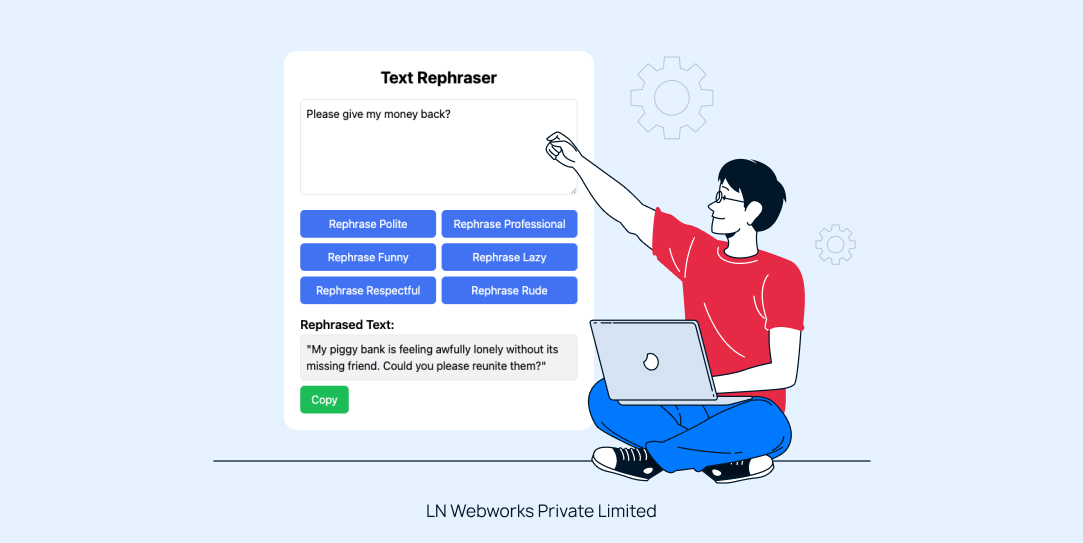
The Gemini API is an advanced generative language model designed for natural language processing tasks, including text generation and rephrasing. By leveraging this API, you can create applications that produce human-like text based on user inputs.
This guide provides a simple, step-by-step process for building a text rephraser that rewrites sentences while retaining their original meaning.
To build this tool, you’ll need:
– **Node.js** and **npm** installed on your machine.
– A **React** application set up. You can create one using the command:
npx create-react-app text-rephraser cd text-rephraser
We’ll use Axios for making API requests. Install it by running:
npm install axios
In the `src` folder, create a new file called `TextRephraser.js`. This component will handle the user interface and interaction.
javascript

// src/TextRephraser.js

import React, { useState } from 'react';

import axios from 'axios';

const TextRephraser = () => {

    const [inputText, setInputText] = useState('');

    const [rephrasedText, setRephrasedText] = useState('');

    const [loading, setLoading] = useState(false);

    const [error, setError] = useState('');
    const handleRephrase = async (style) => {

        setLoading(true);

        setError('');
const formattedInput = `Rephrase this text as ${style}: ${inputText}`;
        try {

            const response = await axios.post(

                `https://generativelanguage.googleapis.com/v1beta/models/gemini-1.5-flash-latest:generateContent?key=YOUR_API_KEY`, // Replace with your API key

                {

                    contents: [

                        {

                            parts: [

                                {

                                    text: formattedInput,

                                },

                            ],

                        },

                    ],

                },

                {

                    headers: {

                        'Content-Type': 'application/json',

                    },

                }

            );
            const generatedContent = response.data.candidates[0].content.parts[0].text;

            setRephrasedText(generatedContent);

        } catch (err) {

            setError('Error rephrasing the text. Please try again.');

        } finally {

            setLoading(false);

        }

    };
    return (

        <div className="max-w-md mx-auto p-6 bg-white rounded-lg shadow-lg">

            <h1 className="text-2xl font-bold mb-4 text-center">Text Rephraser</h1>

            <textarea

                value={inputText}

                onChange={(e) => setInputText(e.target.value)}

                placeholder="Enter text to rephrase"

                rows="5"

                className="w-full p-2 border rounded-md focus:outline-none focus:ring-2 focus:ring-blue-500 mb-4"

            />

            <div className="grid grid-cols-2 gap-2">

                {['Polite', 'Professional', 'Funny', 'Lazy', 'Respectful'].map((style) => (

                    <button

                        key={style}

                        onClick={() => handleRephrase(style)}

                        disabled={loading}

                        className={`py-2 px-4 rounded-md text-white transition duration-300 ${loading ? 'bg-gray-400' : 'bg-blue-500 hover:bg-blue-600'}`}

                    >

                        {loading ? 'Rephrasing...' : `Rephrase ${style}`}

                    </button>

                ))}

            </div>

            {error && <p className="mt-4 text-red-500">{error}</p>}

            {rephrasedText && (

                <div className="mt-4">

                    <h2 className="text-lg font-semibold">Rephrased Text:</h2>

                    <p className="p-2 border rounded-md bg-gray-100">{rephrasedText}</p>

                    <button

                        onClick={() => navigator.clipboard.writeText(rephrasedText)}

                        className="mt-2 py-1 px-3 bg-green-500 text-white rounded-md"

                    >

                        Copy

                    </button>

                </div>

            )}

        </div>

    );

};
export default TextRephraser;
In `src/App.js`, import and include the `TextRephraser` component: ```javascript
// src/App.js
import React from 'react';
import TextRephraser from './TextRephraser';function App() {
return (
<div className="App">
<TextRephraser />
</div>
);
}
export default App;
Now that everything is set up, you can run your application using:
npm start
Make sure to replace `YOUR_API_KEY` in the Axios request with your actual Gemini API key. Also, you might want to style your application further using CSS or frameworks like Tailwind CSS for a more appealing look.
Congratulations! You’ve built a simple yet powerful Text Rephraser tool using the Gemini API. This application can help users improve their communication by rephrasing text in various tones.
Get innovative, customized solutions for all your digital needs, including powerful AI-driven tools like Text Rephraser. Our skilled team of developers and designers is ready to help you create custom applications. Whether you’re looking to integrate AI for content rephrasing, e-commerce, or other web and mobile developments, partner with us at LN Webworks to achieve your business goals effectively.

 Other, SaaS Development
SaaS CRMs win on speed. Custom wins on fit and ownership. This isn’t a pitch for either one. Every early-stage SaaS company hits this decision within the first year, usually right after the founder realizes a spreadsheet isn’t a CRM. The default answer is almost always a SaaS CRM: HubSpot, Salesforce, Zoho, sign up in […]
 Other
Other
Most “audits” and “assessments” promise clarity but deliver a sales deck with language that lacks clarity. You book the call expecting evidence about your specific platform, and what shows up is a generic pitch for whichever package is easiest for the firm to sell. That’s the actual reason process transparency matters here, not because a […]
 Other
Other
In late June and early July, videos started circulating on Instagram of people walking up to moving e-rickshaws, tapping a phone, and watching the vehicle lose power mid-ride. It spread as a prank trend before anyone fully understood the mechanism. Drivers in Patna (India) reported it first, assuming mechanical failure, until investigators traced it to […]