How To Use Cron Jobs For Task Automation In Drupal
 LN Webworks
·
18 Sep, 2025
LN Webworks
·
18 Sep, 2025
The efficiency of any website is a must in this fast-paced world of web development. One of the most important tools to maximize the efficiency of your Drupal site is cron jobs.
Cron jobs are powerful tools that automate any kind of routine tasks of the website which decreases the big load of a developer or site administrator. In this article, I will give you important insights about cron jobs and how we can use them within Drupal, followed by how we customize the tasks by overriding services of the ultimate cron job module.
What is Cron Jobs in Drupal?
Cron in Drupal works quite well as it coordinates all the backstage tasks. It handles everything from clearing caches to checking for updates of any kind of content and executing scheduled tasks set by your modules.
Default Cron Jobs Provided by Drupal Core
By default, Drupal’s cron system quietly runs in the background,we just need to set the time that how often we want cron to run it can be within an hour, day, week or month as our requirement. Cron jobs are typically triggered by visitors while accessing the site. For tasks needing precise timing or longer processing and for this cron jobs may not be ideal.
Cron Jobs with Contributed Module Ultimate Cron
The Ultimate Cron module provides vast functionality for Drupal’s cron, letting developers customize cron jobs for those automated tasks which do not require their interruption.
Ultimate Cron Custom Functionality
Ultimate Cron Custom Functionality” refers to the advanced capabilities offered by Drupal’s Ultimate Cron module for tailoring cron job execution to specific needs. With this functionality, Drupal site administrators can customize cron jobs beyond the standard configurations.
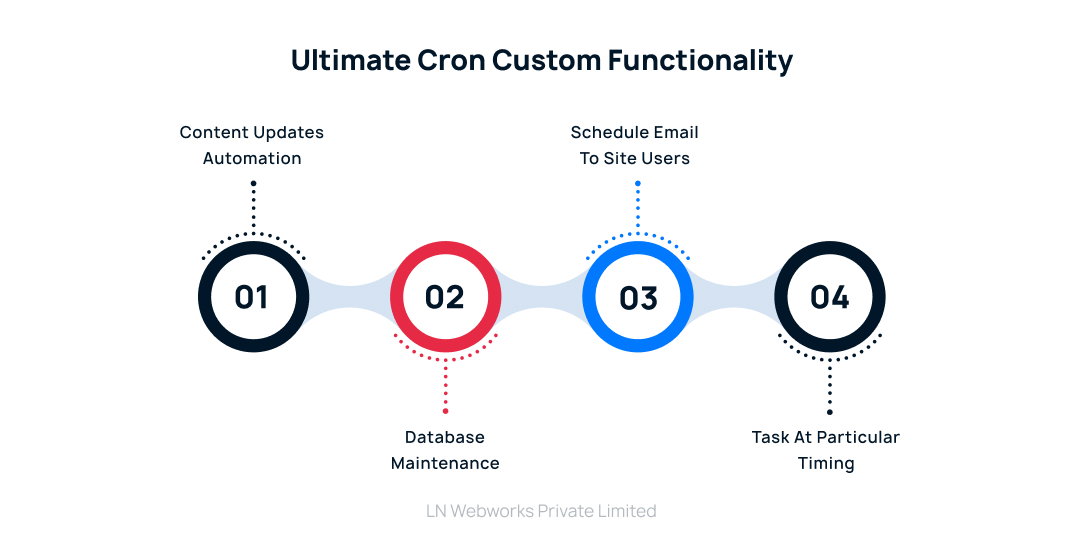
1. Content Updates Automation
Ultimate Cron helps us to automate or update any content at a specific scheduled time. For example, let’s assume our requirement is to publish articles/newsletters/blogs once in a week without any manual interruption.
/**

* Implements hook_cron_job().

*/

function your_module_cron_job() {

$query = Drupal::entityQuery('node')

->condition('type', 'article')

->condition('status', FALSE);   //articles which are not published yet

$node_ids = $query->execute();

foreach ($node_ids as $id) {

$node = DrupalnodeEntityNode::load($id);

$node->setPublished(TRUE);  //publish the unpublished articles

$node->save();

}

}
2. Database Maintenance
Ultimate Cron module lets you schedule routine database maintenance tasks like cache clearance and table optimization which keeps our site run smoothly behind the scenes. We can also invalidate the cache of a particular block or form also.
 * Implements hook_cron_job().

*/

function your_module_cron_job() {

Cache::invalidateAll(); $connection = Drupal::database();

$connection->query('OPTIMIZE TABLE {cache};');

$connection->query('OPTIMIZE TABLE {cache_bootstrap};');

}
3. Schedule Emails to Site Users
With Ultimate Cron, we can automate sending scheduled emails to users/customers of our website.It can be newsletters or reminders, with cron jobs we can customize it easily.
/**

* Implements hook_cron_job().

*/

function your_module_cron_job() {

$uids = Drupal::entityQuery('user')

->condition('field_subscribe_to_newsletter', 1)

->execute(); foreach ($uids as $uid) {

$user = DrupaluserEntityUser::load($uid);

if ($user) {

// Get the user's email.

$email = $user->getEmail();

$params = [

'subject' => 'Subject of the mail',

'message' => 'Message you want to sent do particular user',

];

$module = "your_module";
$key = "email_verification_mail_key";
$to = $params;
$langcode = 'en';
$msg = Drupal::service('plugin.manager.mail')->mail($module, $key, $to, $langcode, $params);
}
}
}
4. Task at Particular Timing
With the Ultimate Cron module, we can schedule a particular task hourly as per our requirements. For example, we can set up custom tasks like remove php warnings to run every hour, ensuring that they’re executed exactly when required.
/**

* Implements hook_cron_job().

*/

function your_module_cron_job() {

$last_run = Drupal::state()->get('your_module_last_run');

$current_time = Drupal::time()->getRequestTime();

$interval = 3600; if ($current_time - $last_run >= $interval) {

remove_php_warnings_from_logs();
    Drupal::state()->set('your_module_last_run', $current_time);

}

}
function remove_php_warnings_from_logs() {

$logs = Drupal::logger('php')->get('warning', NULL, 50, TRUE); foreach ($logs as $log) {

if (strpos($log['message'], 'PHP Warning') !== false) {

Drupal::logger('php')->delete($log['wid']);

}

}

}
Things you should be careful about before integrating Ultimate Cron:
- Ensure the Ultimate Cron module is properly installed through composer and configured correctly as per requirement.
- Need to regularly monitor your cron job execution logs for any suspicious errors.
- Always look for optimized cron job configurations for optimal performance.
- Implement error handling and logging mechanisms like try/catch or Drupal logger for efficient troubleshooting.
Let’s Wrap It Up!
At last we can say, cron is the core of task automation in Drupal. The default system manages crucial maintenance tasks, while the Ultimate Cron module expands functionality with custom jobs that enhance it. By using Cron and Ultimate Cron, developers can improve workflows, boost efficiency, and maximize Drupal’s potential.
Are you prepared to use Of Cron Jobs Task automation in Drupal in projects? Leading Drupal development firm LN Webworks is here to assist you with it. Reach out to us right now to see how our proficiency with Drupal can elevate your project to new heights.
Author