How To Upgrade From Drupal 7 to 10: Step By Step Guide
 LN Webworks
·
04 Sep, 2025
LN Webworks
·
04 Sep, 2025
Since its debut in 2010, Drupal 7 has provided a stable foundation for innumerable websites. But moving to a newer version—like Drupal 10—becomes crucial to guarantee security, performance, and access to the newest features as Drupal 7 approaches its end of life on January 5, 2025.
Even though this Drupal upgrade has the potential to be revolutionary, it’s important to know what features you might face while upgrading from Drupal 7 to 10. This will enable you to plan appropriately and gain a clear understanding of what to anticipate.
What Phases Are Involved in Drupal 7 to Drupal 10 Upgrade
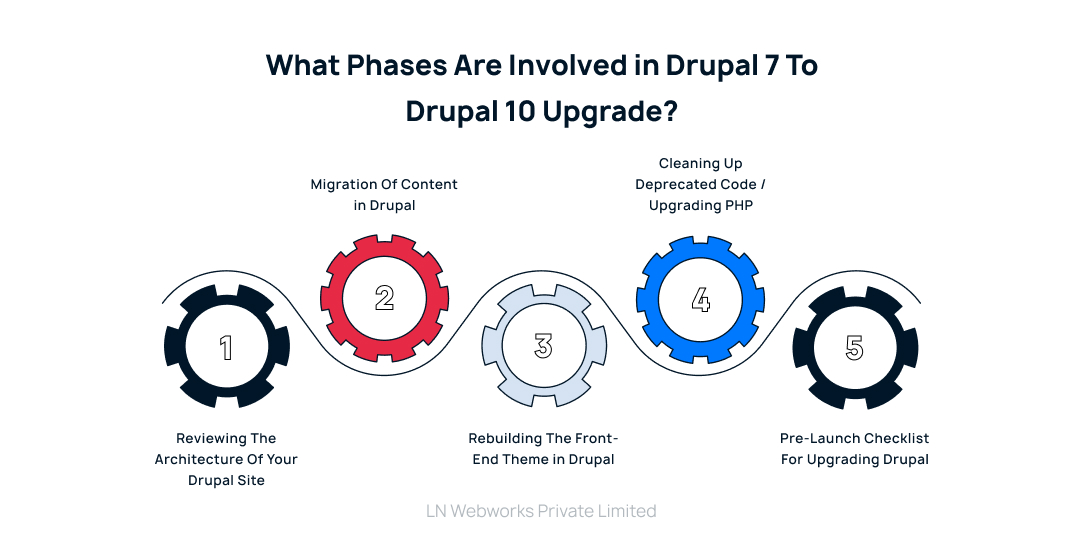
Phase 1: Reviewing the Architecture of Your Drupal Site
Assess your Drupal website to see if it’s ready to be updated to the newest version of Drupal Core. This evaluation begins with a thorough review of its current state. Collaborate with your team to identify areas where editorial processes can be improved, technical issues can be reduced, and the front-end framework can be modernized.
Phase 2: Migration of Content in Drupal
For Drupal 7 sites, content migration is necessary. Using the Content Migration APIs, all content can be migrated to a new site with the latest Drupal Core version without affecting the current live site.
During the migration process, a Content Freeze is required, which means no changes to content can be made temporarily. To achieve this, you can either duplicate content in both the Drupal 7 and Drupal 9 sites or schedule a time for a content freeze.
Phase 3: Rebuilding the Front-end Theme in Drupal
Upgrading the front-end theme of your Drupal site to align with Drupal 9’s contemporary design standards will necessitate a more extensive effort. This entails the reconstruction of templates and various front-end components or codes in collaboration with a skilled front-end developer. Unfortunately, there aren’t any automated tools readily available to streamline this particular aspect of the upgrade process.
In exploring your options, you have three distinct pathways to consider:
TWIG Theme Revamp
Rework your theme using TWIG, Drupal 9’s default templating engine, for enhanced front-end customization and control.
Site Studio Rebuild
Consider a complete front-end overhaul using Site Studio, offering a user-friendly interface for rapid construction and customization.
Decoupled Front-end
Explore transitioning to a decoupled front-end architecture, separating the front-end from the backend for greater flexibility and scalability, potentially utilizing React, Vue.js, or Angular for dynamic user interfaces.
Phase 4: Cleaning Up Deprecated Code / Upgrading PHP
For Drupal 9/10, PHP 8.x is required. Over the past decade, significant changes have occurred in the PHP code from Drupal 7 to Drupal 9, necessitating thorough review and updates. Tools are available to assist in identifying necessary code updates.
Several critical updates and considerations include:
Drupal Core Version
Ensure the Drupal core is up to date.
PHP Version
Upgrade deprecated PHP code, which is time-consuming.
Multi-sites
Review and manage the total number of multi-sites.
Database Size
Assess the size of the database in gigabytes.
Contributed Modules
Evaluate the number of contributed modules used.
Custom Modules
Review and update custom modules as needed.
Views
Views need manual upgrading.
Themes
Themes require manual upgrading.
PHP Theme Templates
Rewriting templates manually may be necessary.
Phase 5: Pre-launch Checklist for Upgrading Drupal
Before you begin the upgrade process, ensure you have completed the following:
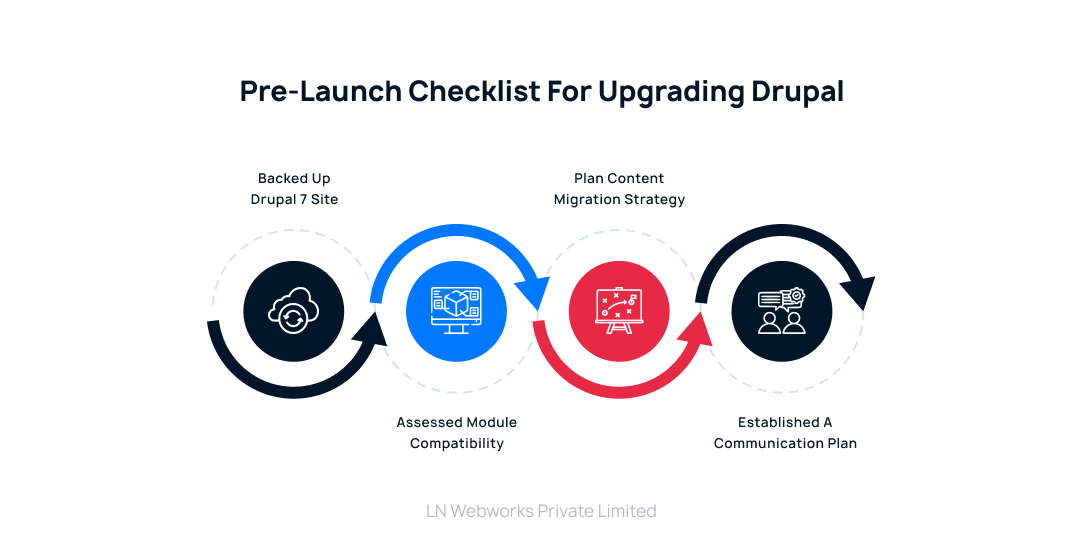
Backed up your entire Drupal 7 site
Having a full backup is crucial in case of any unforeseen issues during the upgrade process.
Assessed module compatibility
Ensure your essential modules are compatible with Drupal 10 or have suitable alternatives available.
Plan your content migration strategy
Determine the method you’ll use to transfer your content to Drupal 10 (e.g., Migrate API, third-party tools).
Established a communication plan
Keep stakeholders informed about the upgrade process timeline and potential impacts.
Here Are Immediate Steps You Can Take
- Install the Upgrade Status module in Drupal, which provides detailed information about your current setup and supports the upgrade to Drupal 10.
- Check your content types and text formats, avoiding the use of PHP or code within fields. Remove or flag any PHP code in database fields before upgrading.
- Audit your views, considering reducing unnecessary ones. Use the Views migration module for assistance, but some views may need manual rebuilding.
- Review custom code and features for PHP compatibility using tools like PHP Compatibility. Consider using the Drupal 7 to 8/9 Module Upgrader to automate parts of this process, though manual intervention will likely still be necessary.
- Evaluate front-end and page-building elements, as Drupal 10 uses Twig templates instead of PHP templates. Plan to manually rebuild your theme templates and functions after migration.
Let’s Wrap it Up!
All in all, upgrading from Drupal 7 to Drupal 10 is an extensive process that involves planning, content migration, front-end theme rebuilding, code cleanup, and compatibility checks. It’s essential to understand the phases involved and allocate sufficient time and resources for each step. By following a structured approach and leveraging available tools, ensures that your websites remain secure, performant, and equipped with the latest features for years to come.
Considering the complexities and potential burden of a 30-week upgrade process, why not entrust the task to experts like LN Webworks? We offer professional Drupal upgrade services, ensuring a smooth and efficient transition. Reach out to us today!
Author